
Configure Ingresses
Ingress rules (Kubernetes Ingress) expose HTTP/HTTPS routes from outside the cluster to internal routing (Kubernetes Service), enabling control of external access to computing components.
Create an Ingress to manage the external HTTP/HTTPS access to a Service.
When creating multiple ingresses within the same namespace, different ingresses MUST NOT have the same Domain, Protocol, and Path (i.e., duplicate access points are not allowed).
TOC
Implementation Method
Ingress rules depend on the implementation of the Ingress Controller, which is responsible for listening to changes in Ingress and Service. After a new Ingress is created, when the Ingress Controller receives a request, it matches the forwarding rule from the Ingress and distributes the traffic to the specified internal routes, as shown in the diagram below.
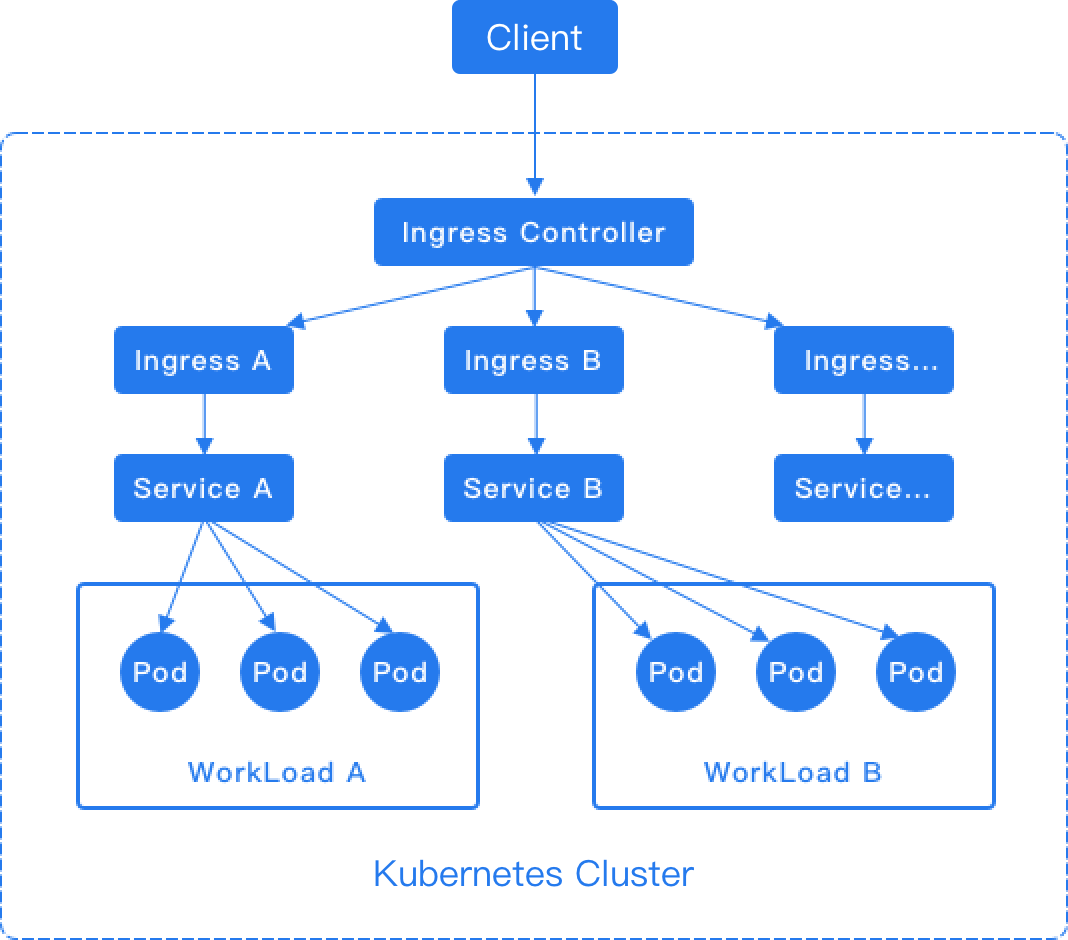
For the HTTP protocol, Ingress only supports the 80 port as the external port. For the HTTPS protocol, Ingress only supports the 443 port as the external port. The platform's load balancer will automatically add the 80 and 443 listening ports.
- Install ingress-nginx as ingress-controller via ingress-nginx-operator
- Install alb as ingress-controller via alb-operator
Example Ingress:
- To see more configurations please refer to nginx-configuration.
nginxto usingingress-nginxcontroller,$alb_nameto use alb as ingress controller.- If you only want to run ingress locally, configure the
hostsbeforehand.
Creating a Ingress by using the web console
-
Access the Container Platform.
-
In the left navigation bar, click Network > Ingress.
-
Click Create Ingress.
-
Reference the instructions below to configure certain parameters.
-
Click Create.