
Create Stretch Type Cluster
A stretch cluster can extend across two geographically distinct locations, providing disaster recovery capabilities for storage infrastructure. In the event of a disaster, when one availability zone in the two zones is completely unavailable, Ceph can still maintain availability.
TOC
Terminology
Typical Deployment Scheme
The following content provides a typical deployment scheme for stretch clusters, along with component descriptions and principles of disaster recovery.
Component Description
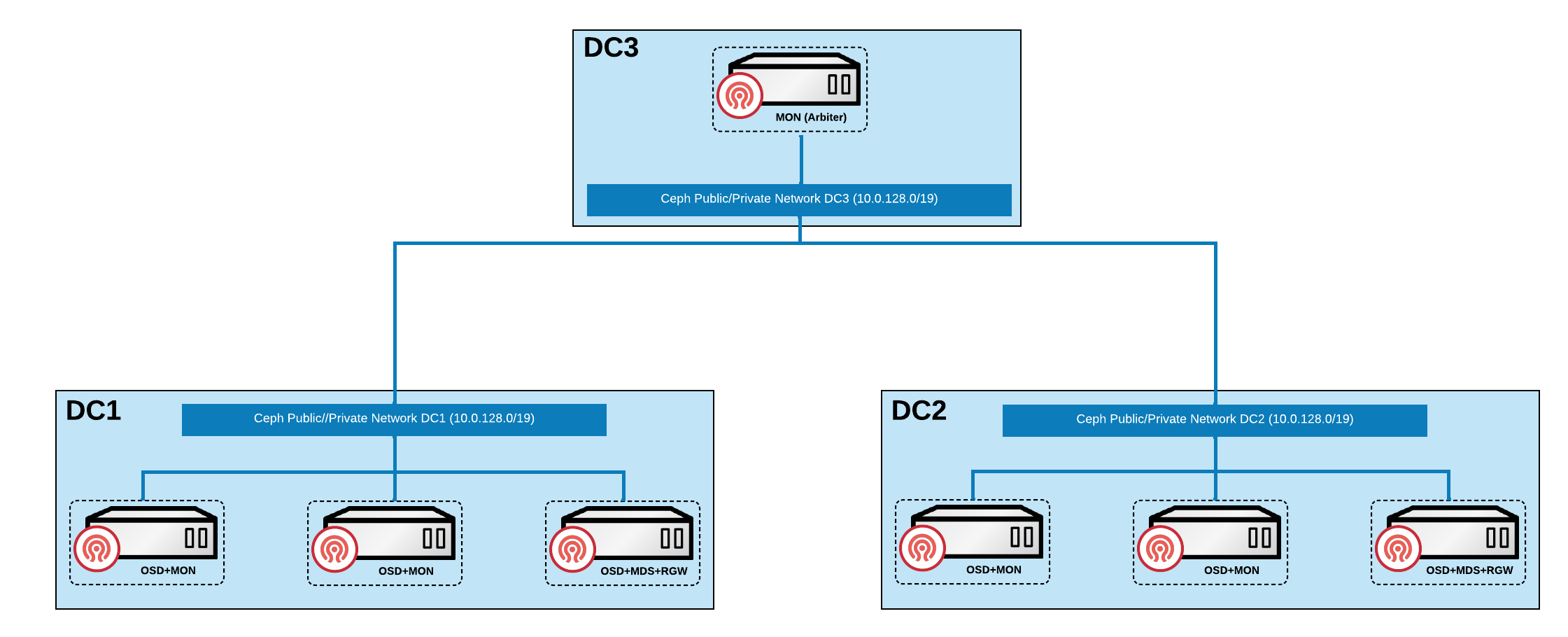
Nodes need to be distributed across three availability zones, including two data availability zones and one quorum availability zone.
-
Both data availability zones need to fully deploy all core Ceph components (MON, OSD, MGR, MDS, RGW), and each data availability zone must configure two MON instances for high availability. When both MON instances in the same data availability zone are unavailable, the system will determine that the availability zone is in a failure state.
-
The quorum availability zone only requires the deployment of one MON instance, serving as the arbitration decision node.
Disaster Recovery Explanation
-
When a data availability zone completely fails, the Ceph cluster will automatically enter a degraded state and trigger an alarm notification. The system will adjust the minimum number of replicas in the storage pool (min_size) from the default of 2 to 1. Since the other data availability zone still maintains dual replicas, the cluster remains available. When the failed data availability zone recovers, the system will automatically execute data synchronization and return to a healthy state; if the failure cannot be repaired, it is recommended to replace it with a new data availability zone.
-
When the network connection between the two data availability zones is interrupted, but they can still connect normally to the quorum availability zone, the quorum availability zone will arbitrate between the two data availability zones based on preset policies, selecting the one in a better state to continue providing services as the primary data zone.
Constraints and Limitations
-
Storage Pool Limitations: Erasure-coded storage pools are not supported, and only replica mechanisms can be used for data protection.
-
Device Classification Limitations: Device class functionality is not supported, and storage cannot be stratified based on device characteristics.
-
Regional Deployment Limitations: Only two data availability zones are supported; no more than two data availability zones can exist.
-
Data Balancing Requirements: The OSD weights of the two data availability zones must strictly remain consistent to ensure balanced data distribution.
-
Storage Medium Requirements: Only all-flash (All-Flash) OSD configurations are permitted, minimizing the time required for recovery after a connection is restored, and reducing the potential for data loss as much as possible.
-
Network Latency Requirements: The RTT (round-trip time) between the two data availability zones must not exceed 10ms, and the quorum availability zone must meet the ETCD specification latency requirements to ensure the reliability of the arbitration mechanism.
Prerequisites
Please classify all or part of the nodes in the cluster into three availability zones in advance, as follows:
-
Ensure that at least 5 nodes are distributed among one quorum availability zone and two data availability zones. Among them, the quorum availability zone must have at least one node, which can be a virtual machine or cloud host.
-
Ensure that at least one availability zone in the three availability zones contains a Master node (control node).
-
Ensure that at least 4 computing nodes are evenly distributed across the 2 data availability zones, with at least 2 computing nodes configured in each data availability zone.
-
Try to ensure that the number of nodes and disk configurations in the two data availability zones are consistent.
Procedure
Tagging Nodes
-
Access Administrator.
-
In the left navigation bar, click Cluster Management > Cluster.
-
Click on the corresponding cluster name to enter the cluster overview page.
-
Switch to the Nodes tab.
-
Based on the planning in the Prerequisites, add the
topology.kubernetes.io/zone=<zone>label to these nodes to classify them into the specified availability zone. Here, replace <zone> with the name of the availability zone.
Create Storage Service
This document only describes the parameters that differ from standard type clusters; for other parameters, please refer to Create Standard Type Cluster.
Create Cluster
Create Storage Pool
Related Operations
Create Standard Type Cluster
For details, please refer to Create Standard Type Cluster.
Cleanup Distributed Storage
For details, please refer to Cleanup Distributed Storage.